You have chosen a service and a device, and now the app asks a question that confuses almost everyone: Xtream Codes, M3U playlist or portal? These are simply three ways of connecting to the same service. Picking the right one for your device makes the difference between a tidy guide with films and series in their own sections, and a long jumbled list. This guide explains Xtream IPTV, M3U and MAG portals in plain English and tells you which to use on each device.
Key takeaways
- Xtream Codes is the best login on most devices: three fields, full guide and on-demand library.
- M3U links work almost everywhere and make a good backup.
- MAG boxes use a portal URL linked to the box’s MAC address.
- Formuler and Android boxes work best with Xtream in MyTVOnline or TiviMate.
Contents:
The three login types explained
Xtream Codes login
Three fields: server URL, username and password. Supported by IPTV Smarters Pro, TiviMate, XCIPTV, MyTVOnline and many others. It is the best choice on most devices because it organises live TV, the guide, films and series for you.
M3U playlist link
One long web address containing your channel list. It works in nearly every player, including desktop apps on Windows and Mac, which makes it a useful backup. The guide may need a separate link.
MAG portal
MAG boxes connect through a portal URL. Instead of a username, the service recognises the box by its MAC address, so you send us the MAC and we link it to your subscription.
Best login type for each device
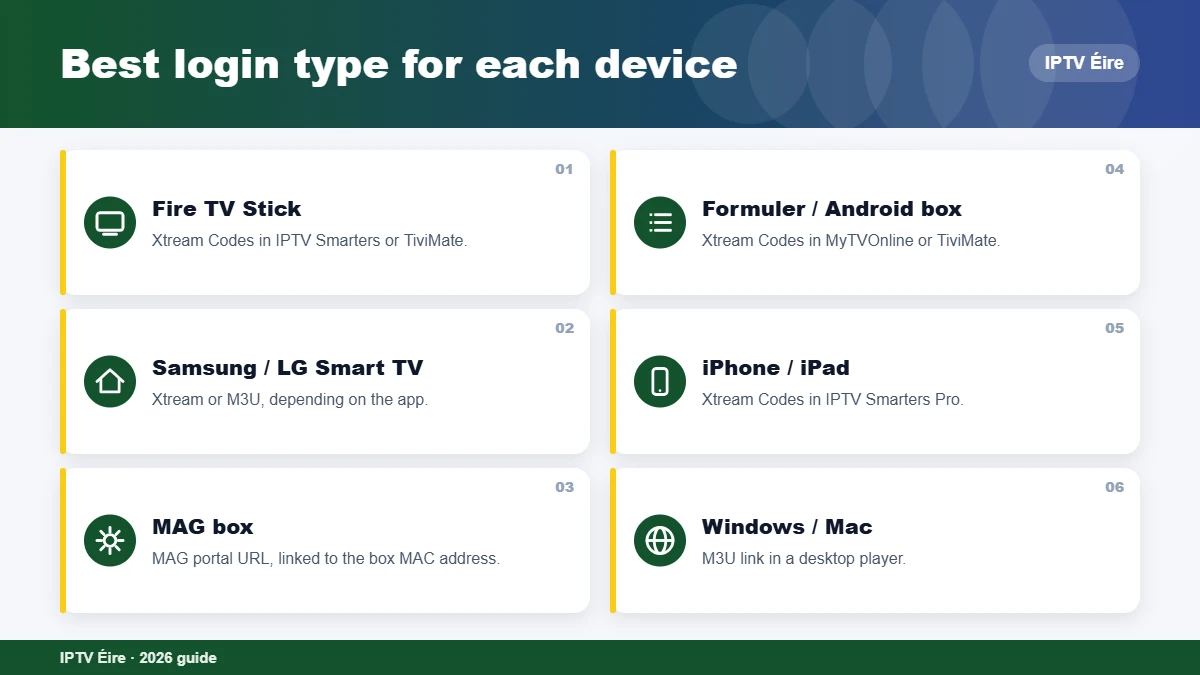
Step-by-step guides with screenshots are on our setup guides page, including Fire Stick, Samsung Smart TV, Formuler and Enigma2, iPhone and iPad and Windows and Mac. To choose an app, read TiviMate vs IPTV Smarters vs IBO Player.
MAG box portal setup
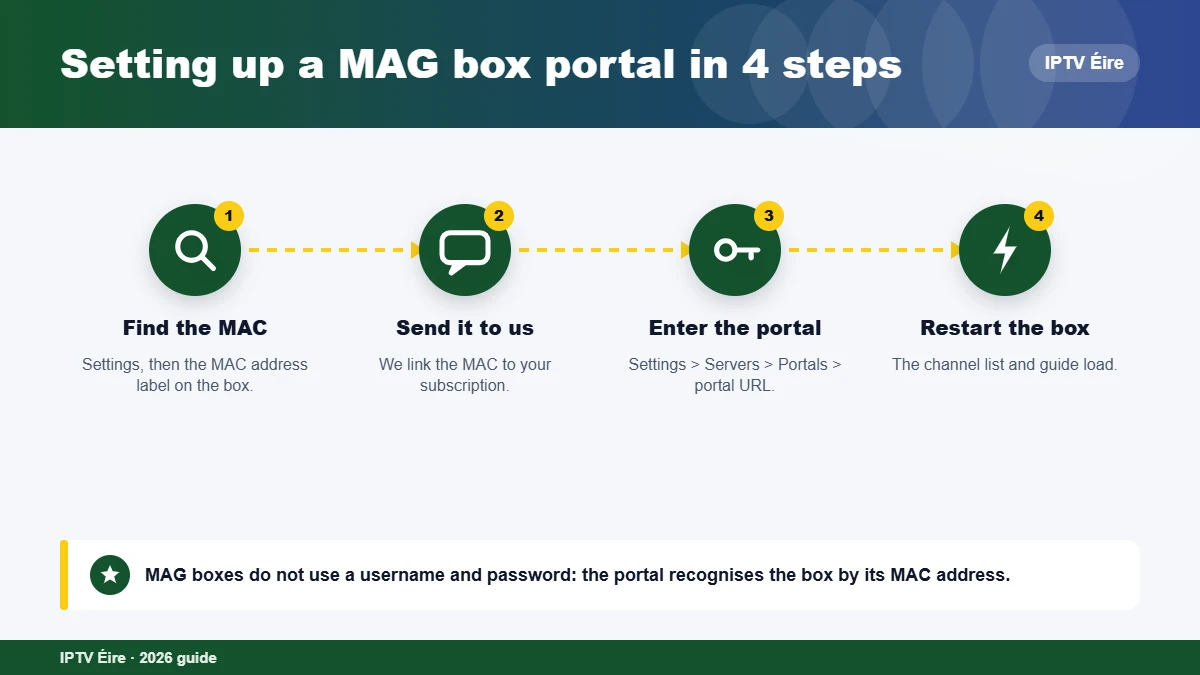
The full walkthrough is in our MAG box setup guide.
Common login errors and quick fixes
| Error | Likely cause | Fix |
|---|---|---|
| Invalid server URL (Xtream) | Missing http:// or port | Copy the URL exactly, including :port |
| Wrong username or password | Typo or hidden space | Retype carefully; check capitals |
| Playlist will not load (M3U) | Link cut off when copied | Paste the full link in one go |
| STB blocked (MAG) | MAC not linked yet | Send us the MAC, then restart the box |
| Empty TV guide | Guide not refreshed | Refresh the EPG in settings |
Still buffering once connected? See our nine buffering fixes.
Plans
| Plan | Price | Per month |
|---|---|---|
| 1 month | €14.99 | €14.99 |
| 3 months | €29.99 | €10.00 |
| 6 months | €39.99 | €6.67 |
| 12 months | €49.99 | €4.17 |
Start with a 30-minute free trial (Fire Stick users can follow our trial walkthrough), see our pricing and read our terms and refund policy.
Safe and legal viewing
Install apps only from official app stores, keep your login and MAC details private and pay with a method that leaves a record. Make sure the way you watch complies with the rules that apply in Ireland. More answers are on our FAQ page.
Xtream IPTV, M3U and MAG: frequently asked questions
What is Xtream IPTV?
Xtream IPTV means connecting with an Xtream Codes login: a server URL, a username and a password. Most modern apps support it, and it usually loads the TV guide, films and series automatically.
What is the difference between Xtream, M3U and a MAG portal?
Xtream uses three login details in an app. M3U is a single long playlist link that works in almost any player. A MAG portal is used by MAG set-top boxes and recognises the box by its MAC address instead of a username.
Which login type is best on a Fire Stick?
Xtream Codes, in an app such as IPTV Smarters Pro or TiviMate. It gives the fullest guide and on-demand library.
How do I set up IPTV on a MAG box?
Send us the MAC address printed on the box, then enter the portal URL under Settings, Servers, Portals and restart the box.
Can I try each login type before buying?
Yes. Our 30-minute free trial includes the details you need for your device.
The bottom line
Use an Xtream IPTV login wherever your app supports it, keep the M3U link as a backup, and use the portal on a MAG box. Matching the login to the device gives you a cleaner guide, tidier on-demand sections and far fewer errors.
Not sure which to choose? Message us on WhatsApp with your device or visit our support page.