The Amazon Fire TV Stick is the most popular way to watch IPTV in Ireland: it is cheap, it plugs into any TV and it runs the main apps smoothly. It is also the easiest device for an IPTV free trial, because you can go from requesting the trial to watching your first channel in about ten minutes.
This guide walks through each step on a Fire Stick and explains what to test during the 30 minutes so you can make a confident decision.
Key takeaways
- Our IPTV free trial runs for 30 minutes with instant activation and no card.
- Update the Fire Stick and install the app from the official Amazon Appstore.
- Add favourites first so you can test your key channels quickly.
- Use the trial to check live sport, the TV guide and support.
Contents:
- Six steps on a Fire Stick
- Step-by-step walkthrough
- What to test in 30 minutes
- Quick troubleshooting
- After your trial
- FAQ
IPTV free trial on a Fire Stick: six steps
Step-by-step walkthrough
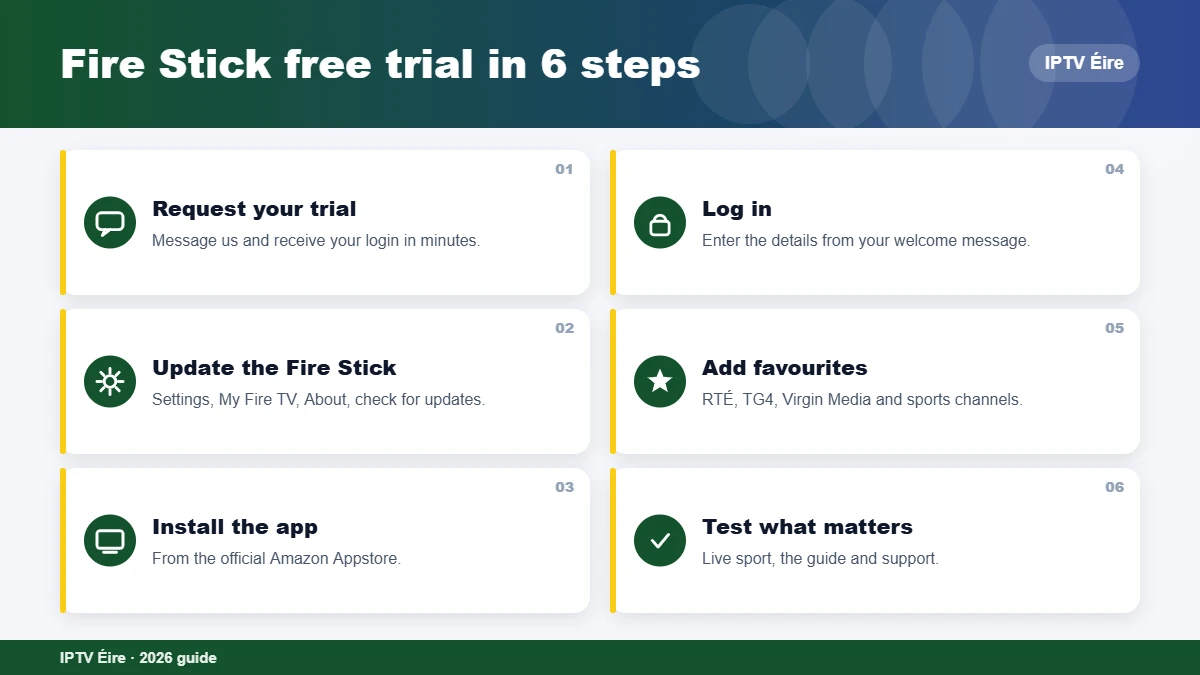
Step 1: Request your free trial
Send us a message on WhatsApp or use the free trial page. Activation is instant, and you receive your login details and app instructions in a few minutes.
Step 2: Update your Fire Stick
Go to Settings, My Fire TV, About, and choose Check for Updates. An up-to-date Fire Stick runs apps faster and more reliably.
Step 3: Install the app from the official store
Search the Amazon Appstore for the app named in your welcome message and install it. Never install files from unknown links.
Step 4: Log in with your trial details
Open the app and enter the login details exactly as shown. If something does not work, send us a screenshot and we will help straight away.
Step 5: Add your favourite channels
Add RTÉ One, RTÉ2, TG4, Virgin Media One and your sports channels to favourites so you can test them quickly.
Step 6: Test what matters in 30 minutes
Watch something live, switch channels a few times, check the TV guide and send support a question. That tells you everything you need to know.
For screenshots of each screen, see our full Fire Stick setup guide or the article on installing IPTV on a Fire Stick 4K in 5 minutes.
What to test in 30 minutes
| Minutes | Test | Good result |
|---|---|---|
| 0–5 | Open RTÉ One, RTÉ2, TG4, Virgin Media One | Each loads in two or three seconds |
| 5–15 | Watch something live | No freezing or quality drops |
| 15–20 | Switch channels ten times | Quick, smooth changes |
| 20–25 | Check the TV guide | Accurate listings for tonight |
| 25–30 | Message support | A quick, useful reply |
Quick troubleshooting
- App will not install: update the Fire Stick and restart it, then try again.
- Login error: check for spaces or capital letters in the username and password.
- Buffering: move the router closer, use 5 GHz Wi-Fi or add an Ethernet adapter. Our nine buffering fixes cover the rest.
- Empty guide: refresh the EPG in the app settings.
Choosing an app? Compare the options in TiviMate vs IPTV Smarters vs IBO Player.
After your trial
| Plan | Price | Per month |
|---|---|---|
| 1 month | €14.99 | €14.99 |
| 3 months | €29.99 | €10.00 |
| 6 months | €39.99 | €6.67 |
| 12 months | €49.99 | €4.17 |
Start your trial on our free trial page, see full details on our pricing page and read our refund policy and terms. Comparing services? Use our side-by-side comparison template.
Safe and legal viewing
Install apps only from the official Amazon Appstore, keep your login private and pay with a method that leaves a record. Make sure the way you watch complies with the rules that apply in Ireland. More answers are on our FAQ page.
IPTV free trial on Fire Stick: frequently asked questions
Can I get an IPTV free trial on a Fire Stick?
Yes. Our 30-minute IPTV free trial works on every Amazon Fire TV Stick model. Request the trial, install the app from the official Amazon Appstore and log in with the details we send you.
How long does it take to set up the trial?
Most people are watching within ten minutes: a couple of minutes to request the trial, a few to install the app and a minute to log in.
Which Fire Stick is best for IPTV?
Any current Fire TV Stick works. The Fire TV Stick 4K or 4K Max gives faster menus and supports 4K on a 4K television.
Do I need card details for the free trial?
No. The free trial needs no card details and no contract.
What happens when the 30 minutes end?
The trial simply stops. If you are happy, choose a plan from €14.99 for one month or €49.99 for 12 months.
The bottom line
A Fire Stick is the quickest way to try IPTV: request the free trial, install the app from the official store, log in and test your channels. Ten minutes of setup and thirty minutes of testing tell you everything you need to know.
Ready to try it? Message us on WhatsApp, claim your free trial or visit our support page.